

Private by Design
All file processing happens on your computer. Your files are never uploaded.
Private Productivity Tools
Get more done. Keep your files private.
PurZeno brings PDF, image and file tools together in one desktop app. Compress, convert, merge, resize, rename and extract text, with all file processing handled locally on your computer.
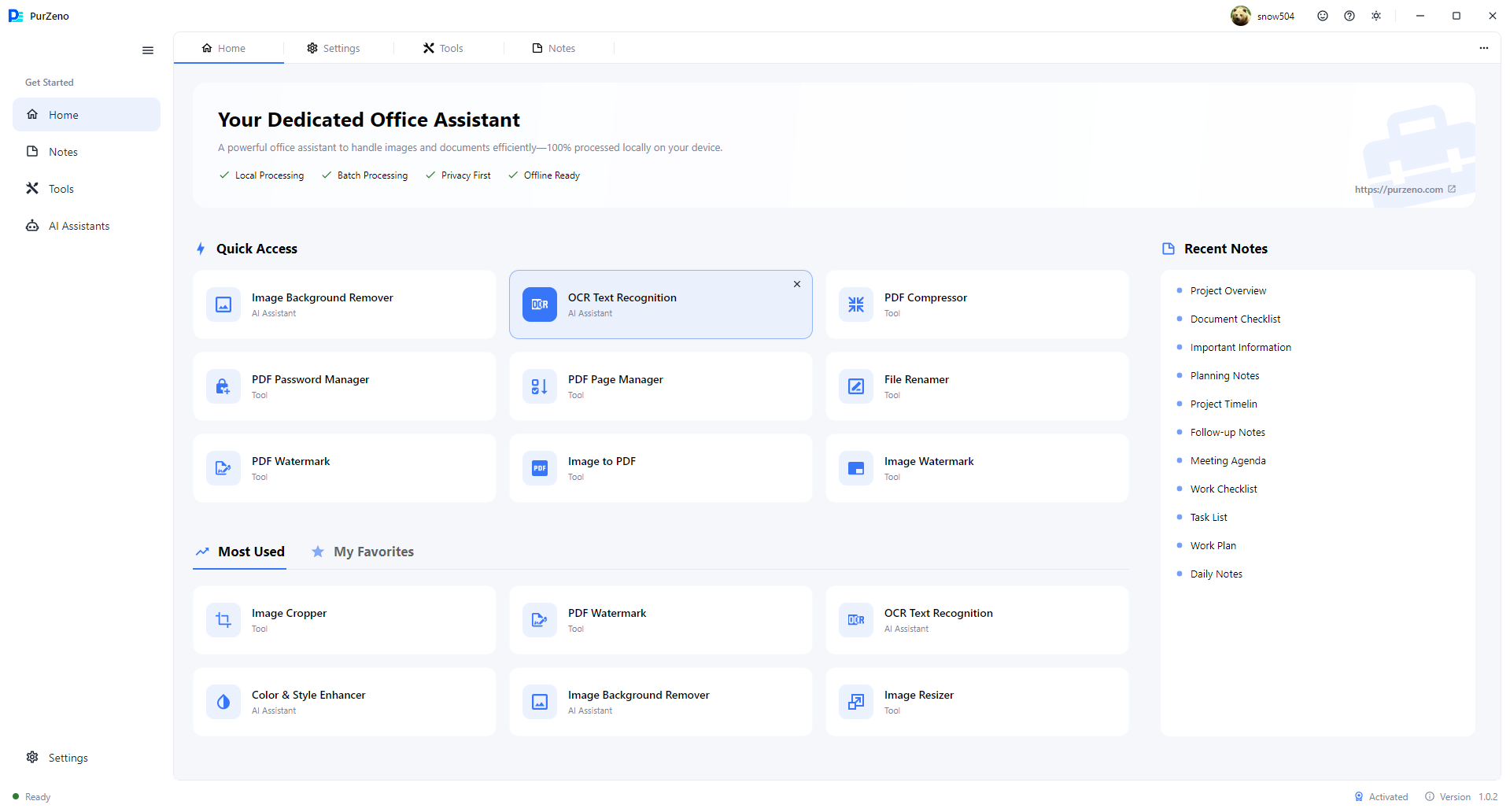
A look inside PurZeno
Find the tool you need, switch between PDF, image, file and AI categories, and get straight to the task in a clean, focused workspace.
Why PurZeno
Privacy, efficiency and everyday convenience, brought together in one desktop app.
All file processing happens on your computer. Your files are never uploaded.
Compress, convert, resize, rename and more, for many files in one run instead of one by one.
PDF, image and file tools, AI assistants and other everyday tools, together in a single desktop app.
Select a tool, add your files and start processing. Three simple steps in a clean, focused interface.
Explore PurZeno
Everything you need for common PDF, image and file tasks, plus AI assistants for text recognition and image editing.
Compress, convert, merge, split and protect your PDF files.
Convert, compress, resize, crop and watermark your images.
Rename files in batches and remove hidden metadata.
AI-powered tools for text recognition and image editing.
Local file processing
PurZeno works on your PDFs, images and files right on your computer. There is no upload step, no cloud conversion and no waiting for a server.
PDF, image and file operations run locally on your device.
Your documents and photos are never sent to PurZeno, the cloud or any other server.
Output files are saved on your computer, and temporary files are kept there too.
When is the internet used?
Signing in, verifying your license and downloading AI models require an internet connection. These activities do not involve uploading your files.
How it works
Select your files
Choose PDFs, images or documents on your computer.
Process locally
PurZeno does the work on your device.
Save your results
Your files stay on your computer.
Built for real work
Whether you are preparing documents, handling hundreds of files or working with confidential records, PurZeno helps you get it done on your own computer.
Office staff, administrators, team members
Prepare reference materials and attachments, and convert files between formats without switching between multiple apps. PurZeno brings everyday PDF and image tasks into one simple desktop app.
Administrators, operations teams, online sellers
Compressing, converting or renaming files one by one eats up hours. Process many files in a single run and spend your time on the work that matters.
Freelancers, small business owners, finance staff
Contracts, financial records, client files and ID documents should not have to pass through someone else's server. Work on them on your own computer, and clear hidden details such as photo EXIF data and document author names before you share them.
Content creators, online sellers, social media managers, marketers
Every platform wants different image sizes, formats and file weights. Prepare product photos, banners and social media visuals in the right size and format, and touch up colors or backgrounds when needed.
Students, teachers, researchers, self-learners
Course materials, scanned pages and reference files pile up fast. Gather resources from different sources, pull text out of images, and save everything in a form that is easy to store and reuse.
Self-employed professionals, remote workers, everyday users
Project files, client documents, receipts and photos all need occasional attention. PurZeno brings together simple tools for the file tasks that come up in work and daily life.
Good to know
Answers about privacy, internet requirements, supported formats and pricing.
PurZeno is a Windows desktop app that puts PDF tools, image tools, file utilities and AI assistants in one place. Compress and convert PDFs and images, merge or split pages, rename files in batches, remove hidden metadata and extract text with OCR, all on your own computer.
No. PurZeno processes your files locally, so they never leave your computer. Signing in and license verification use the internet, but your files are not part of either.
Processing happens on your device, so contracts, financial records and personal files are not sent to an online service.
Many online tools require you to upload files to their servers for processing. PurZeno handles file processing on your own computer, so there is no upload step and your files stay under your control.
Processing your files does not require the internet, but signing in and verifying your license do. If your computer is offline, PurZeno can generate a registration link without a connection. Scan it with your phone, finish registration on the website and get your license.
OCR, Image Background Remover and Color & Style Enhancer use small AI models. Each model is downloaded once, the first time you use it, which needs an internet connection. After that, the processing runs on your computer. Offline model packages are planned.
Yes. Many PurZeno tools handle multiple files in one run, such as compressing, converting, resizing or renaming. Available options and limits vary by tool.
PurZeno supports the formats people use every day, including PDF, Word files and common image formats such as JPG, PNG and WebP. Exact formats vary by tool, so check each tool's page for details.
PurZeno's OCR recognizes text in more than 50 languages, so you can extract text from images in many different scripts.
Yes. PurZeno includes a free trial period so you can try it before you buy. See the pricing page for current plans and trial details.
PurZeno is currently available for Windows. macOS support is planned.
Get PDF, image and file tools in one private desktop app, and keep your files on your computer.
Download PurZenoAvailable for Windows. macOS support is planned. Free trial See pricing